
Learn, Teach, Earn

Golearnam
Join Ongoing Creator ChallengeJoin Ongoing
LoginRegister for FREE
Join Ongoing Creator Challenge
Explore All CoursesHealth, Medicine & Wellness8Digital Marketing & E-Commerce5Business, Finance & Law5Technology & Development2AI & Artificial Intelligence2Creative Arts, Design & Media2Lifestyle, Personal Development & Hobbies1Education, Training & Language1Real Estate & Construction0Farming, Agriculture & Environment0Trades, Industrial & Manual Skills0Logistics, Supply Chain & Operations0
Shop All Digital ProductsMarriage And Relationship12Health, Medicine & Wellness15Lifestyle, Personal Development & Hobbies13Trades, Industrial & Manual Skills0Farming, Agriculture & Environment3Real Estate & Construction0Logistics, Supply Chain & Operations0Digital Marketing & E-Commerce11Education, Training & Language15Cooking & Culinary Arts /3Artificial Intelligence(AI)1Business Finance & Legal9Creative Arts, Design & Media4Technology & Development1
Find a Tutor or CreatorFind a TutorFind a Creator
Guides & TutorialsLatest Articles & Updates
Privacy PolicyTerms of ServiceSupported Countries
Our StoryMission & VisionOur TeamPartnersContact Us
Create WebinarsBecome a TutorSell ProductsAffiliate ProgramFor CreatorsFor OrganizationsFor Businesses
View All PlansEarnings CalculatorSupported CountriesCreator OrganizationsBusiness PlansCreate an OrganizationTeams Overview
LoginRegister for FREE

Trsuted By

Join thousands of professionals onGolearnamteaching and or growing their careers.Start Learning for FREE

Quick Links

  • Home
  • For Creators
  • For Organizations
  • For Businesses
  • Courses
  • About Us
  • Contact
  • Articles

Marketplace

  • Browse GoStore
  • Sell Your Products
  • Become a Tutor
  • Host a Webinar
  • Guides
  • Supported Countries

Discover

  • Browse Marketplace
  • Course Categories
  • Get Started
  • Sign In
  • Apply as Tutor

Legal and Accessibility

  • Terms of Service
  • Compliance
  • Privacy
  • Disclaimer
  • Refund Policy
  • Sitemap

Golearnam is an educational platform. The courses and materials provided are for informational and learning purposes only. We do not guarantee specific career outcomes or job placements.
© 2026 Kings Digital Group. All rights reserved.

FacebookInstagramTikTokYouTubeWhatsApp
Powered byKings Digital GroupKings Digital Group
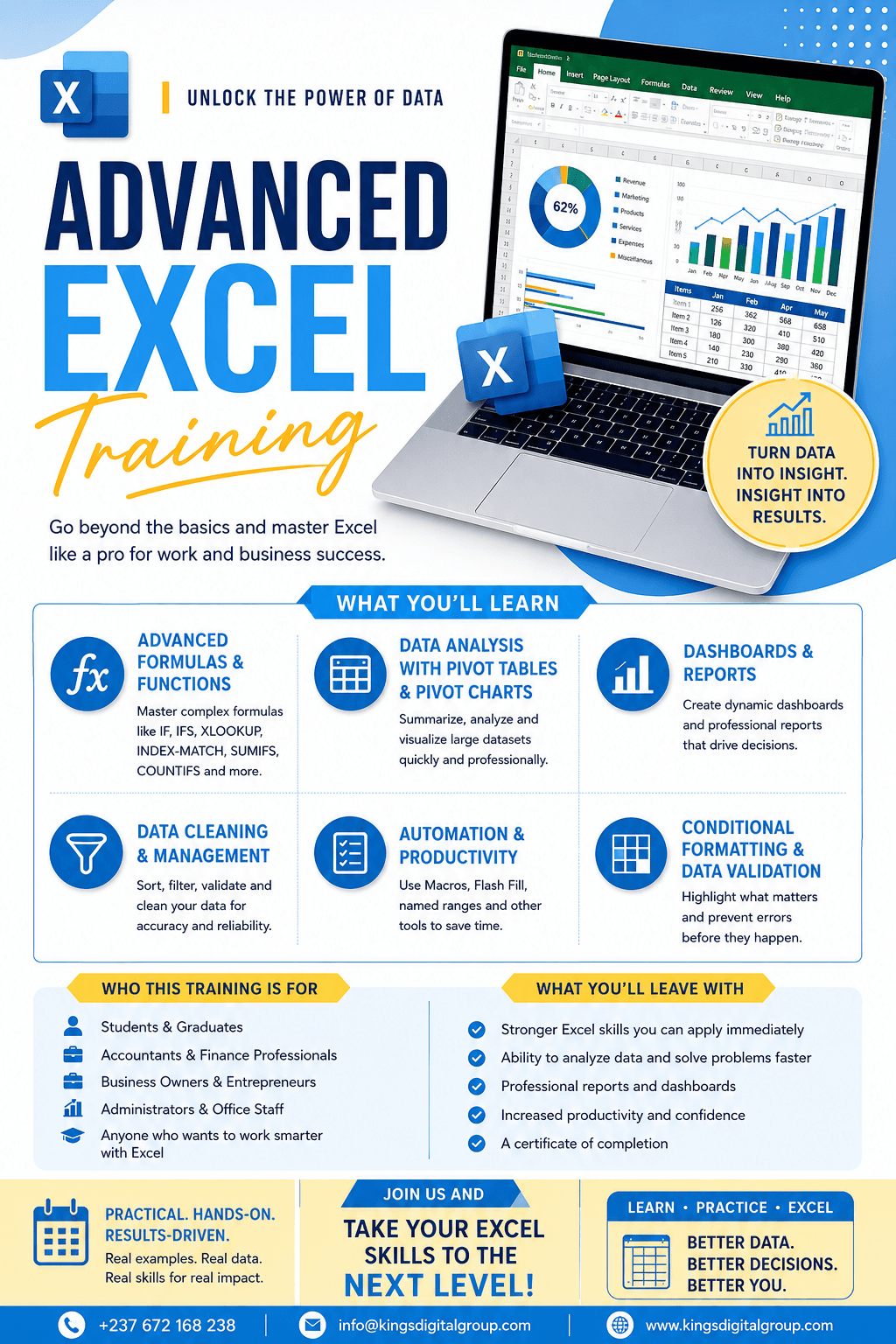
Advance Excel for Data Analysis With Mary Louisa
Certificate included

Advance Excel for Data Analysis With Mary Louisa

A course by
K
KINGS DIGITAL BOOTCAMP
0Students
4Installments
Online
FCFA 40,000
  • Self-paced learning. You study on your schedule
  • Lifetime access to all course content
  • Certificate of completion included
  • Learn from any device, anywhere
  • Access to the online learning community
Start for FCFA 10,000
FCFA 40,000
or 4 installments

Select Installments

INSTALLMENT ONE: Advance Excel for Data Analysis STARTER
FCFA 10,000
We will learn how to use advanced formulas and functions, IF statements, XLOOKUP, INDEX and MATCH, SUMIFS and COUNTIFS, data validation, conditional formatting, PivotTables, PivotCharts, dashboards, data cleaning, and other powerful Excel tools. We will also work with real-life business examples, because my goal is not just for you to memorize Excel formulas. My goal is for you to understand when, why, and how to use them in your everyday work
1

Recap of MS Excel Basic

Quick Transition into Advanced Excel A fast refresher on the essentials before things get advanced: workbook navigation, cell referencing (relative, absolute, mixed), core formulas, sorting and filtering, and basic formatting. Ensures everyone starts on the same footing and can follow the more complex work ahead.

2

Logical Functions

Teach Excel to make decisions. Covers IF, nested IF, IFS, AND, OR, NOT, IFERROR and IFNA to build formulas that test conditions and return different results automatically — the backbone of any smart spreadsheet.

3

Lookup Functions

Pull data from anywhere in your workbook without manual searching. Covers VLOOKUP, HLOOKUP, INDEX-MATCH, and the modern XLOOKUP, plus how to handle errors and lookups across multiple sheets.

4

Conditional Formatting

Make your data speak for itself. Learners apply colour scales, data bars, icon sets and formula-driven rules to highlight trends, flag exceptions and spot outliers the moment they appear — no extra analysis needed.

5

Data Validation

Control what goes into your spreadsheet. Covers drop-down lists, number and date restrictions, custom formula rules, input messages and error alerts — so your data stays clean, consistent and error-free at the point of entry.

Purchase to access this lesson
INSTALLMENT TWO: Advance Excel for Data Analysis INTERMEDIATE
FCFA 10,000
We will learn how to use advanced formulas and functions related to Accounting Transactions, IF statements, XLOOKUP, INDEX and MATCH, SUMIFS and COUNTIFS, data validation, conditional formatting, PivotTables, PivotCharts, dashboards, data cleaning, and other powerful Excel tools. We will also work with real-life business examples, because my goal is not just for you to memorize Excel formulas. My goal is for you to understand when, why, and how to use them in your everyday work
1

Charts and Visualization

Turn raw numbers into visuals that communicate. Covers choosing the right chart type for the message (column, line, pie, combo), formatting for clarity, adding trendlines and data labels, and building sparklines for compact in-cell trends.

2

Pivot Tables and Analysis

The fastest way to summarise large datasets. Learners build pivot tables from scratch, group and filter data, create calculated fields, add slicers and timelines, and use pivot charts to explore data from multiple angles in seconds.

3

Goal Seek

Work backwards from the answer you want. Learners use Goal Seek to find the input value needed to hit a target result — ideal for break-even analysis, loan repayment planning and sales target modelling.

4

SUMIF and SUMIFS

Add up only what matters. Covers summing values based on one condition (SUMIF) or several at once (SUMIFS), with practical examples like totalling sales by region, by product or within a date range.

5

COUNTIF and COUNTIFS

Count with conditions attached. Learners count entries that meet specific criteria — one condition or many — to answer questions like how many orders exceeded a threshold, or how many staff fall into a given category.

6

Budget Template (Capstone)

Bring it all together. Learners build a complete, working budget from scratch — combining formulas, lookups, conditional formatting, data validation, pivot tables and charts into one dashboard-style workbook they can reuse or adapt for real work.

Purchase to access this lesson
INSTALLMENT THREE: Advance Excel for Data Analysis ADVANCE
FCFA 10,000
Will cover Power Query in Excel, MIS Report, User Form in Excel, Registration Form in Excel, Recover Unsaved Data in Excel, Project plan in Excel and Excel Shortcuts
1

Power Query in Excel

Automate the messy part of data prep. Learners use Power Query to import, clean, reshape and combine data from multiple sources (files, sheets, folders) into a single, refreshable table — no manual copy-pasting required

2

MIS Report

Build the reports management actually relies on. Covers structuring a Management Information System report in Excel — pulling data together, summarising key metrics, and formatting it for quick, recurring decision-making.

3

User Form in Excel

Go beyond the spreadsheet grid. Learners build custom data-entry forms using VBA UserForms, giving non-technical users a clean interface to input data without touching formulas directly

4

Registration Form in Excel

A hands-on project applying data validation, form controls and basic VBA to build a functional registration form — capturing, storing and organising entries into a structured worksheet.

5

Recover Unsaved Data in Excel

Practical troubleshooting every user needs. Covers Excel's AutoRecover and AutoSave features, the unsaved workbook recovery folder, and best practices to avoid losing work in the first place

6

Project Plan in Excel

Build a working project tracker from the ground up. Covers task lists, timelines, Gantt-style charts using conditional formatting, milestone tracking, and status dashboards to keep a project visible at a glance

7

Excel Shortcuts

Work faster, click less. A rapid-fire module covering the keyboard shortcuts and navigation tricks that separate efficient Excel users from everyone else — a nice high-energy close to the course.

Purchase to access this lesson
INSTALLMENT FOUR: Advance Excel for Data Analysis MASTER CLASS
FCFA 10,000
Covering Macro and VBA in Excel and step by step PDF for better understanding
1

Macros

Automate repetitive tasks without writing code. Learners use the macro recorder to capture a sequence of actions — formatting, data entry, calculations — and replay it with a single click or keyboard shortcut, saving time on anything done more than once.

2

VBA (Visual Basic for Applications)

Take automation further with real code. Learners get an introduction to writing and editing VBA — variables, loops, conditional logic and simple procedures — to build custom functions and automate tasks that macros alone can't handle, including powering the UserForms and registration form built earlier in the course.

Purchase to access this lesson

This course includes:

4 installments
Certificate of completion
Lifetime access
Mobile and desktop access
Flexible payment options

About This Course

Explain more about your course, its beneWe will learn how to use advanced formulas and functions, IF statements, XLOOKUP, INDEX and MATCH, SUMIFS and COUNTIFS, data validation, conditional formatting, PivotTables, PivotCharts, dashboards, data cleaning, and other powerful Excel tools.

We will also work with real-life business examples, because my goal is not just for you to memorize Excel formulas. My goal is for you to understand when, why, and how to use them in your everyday work fits, and learning outcomes.

Prerequisites (Tools/Skills You'll Need)

  • excel
  • Advance Excel Training

About the Organization

Meet the Organization

K

KINGS DIGITAL BOOTCAMP

Organization

3
About the Organization

At Kings Digital Bootcamp, Our mission is to help people of all ages learn useful digital skills that can open up real opportunities

3
Students
3
Courses
0.0
Rating
0
Reviews

Student Reviews

0.0

Based on 0 reviews

5
0
4
0
3
0
2
0
1
0

No reviews yet

Be the first to share your experience with this course

FCFA 40,000
or 4 installments

Select Installments

INSTALLMENT ONE: Advance Excel for Data Analysis STARTER
FCFA 10,000
We will learn how to use advanced formulas and functions, IF statements, XLOOKUP, INDEX and MATCH, SUMIFS and COUNTIFS, data validation, conditional formatting, PivotTables, PivotCharts, dashboards, data cleaning, and other powerful Excel tools. We will also work with real-life business examples, because my goal is not just for you to memorize Excel formulas. My goal is for you to understand when, why, and how to use them in your everyday work
1

Recap of MS Excel Basic

Quick Transition into Advanced Excel A fast refresher on the essentials before things get advanced: workbook navigation, cell referencing (relative, absolute, mixed), core formulas, sorting and filtering, and basic formatting. Ensures everyone starts on the same footing and can follow the more complex work ahead.

2

Logical Functions

Teach Excel to make decisions. Covers IF, nested IF, IFS, AND, OR, NOT, IFERROR and IFNA to build formulas that test conditions and return different results automatically — the backbone of any smart spreadsheet.

3

Lookup Functions

Pull data from anywhere in your workbook without manual searching. Covers VLOOKUP, HLOOKUP, INDEX-MATCH, and the modern XLOOKUP, plus how to handle errors and lookups across multiple sheets.

4

Conditional Formatting

Make your data speak for itself. Learners apply colour scales, data bars, icon sets and formula-driven rules to highlight trends, flag exceptions and spot outliers the moment they appear — no extra analysis needed.

5

Data Validation

Control what goes into your spreadsheet. Covers drop-down lists, number and date restrictions, custom formula rules, input messages and error alerts — so your data stays clean, consistent and error-free at the point of entry.

Purchase to access this lesson
INSTALLMENT TWO: Advance Excel for Data Analysis INTERMEDIATE
FCFA 10,000
We will learn how to use advanced formulas and functions related to Accounting Transactions, IF statements, XLOOKUP, INDEX and MATCH, SUMIFS and COUNTIFS, data validation, conditional formatting, PivotTables, PivotCharts, dashboards, data cleaning, and other powerful Excel tools. We will also work with real-life business examples, because my goal is not just for you to memorize Excel formulas. My goal is for you to understand when, why, and how to use them in your everyday work
1

Charts and Visualization

Turn raw numbers into visuals that communicate. Covers choosing the right chart type for the message (column, line, pie, combo), formatting for clarity, adding trendlines and data labels, and building sparklines for compact in-cell trends.

2

Pivot Tables and Analysis

The fastest way to summarise large datasets. Learners build pivot tables from scratch, group and filter data, create calculated fields, add slicers and timelines, and use pivot charts to explore data from multiple angles in seconds.

3

Goal Seek

Work backwards from the answer you want. Learners use Goal Seek to find the input value needed to hit a target result — ideal for break-even analysis, loan repayment planning and sales target modelling.

4

SUMIF and SUMIFS

Add up only what matters. Covers summing values based on one condition (SUMIF) or several at once (SUMIFS), with practical examples like totalling sales by region, by product or within a date range.

5

COUNTIF and COUNTIFS

Count with conditions attached. Learners count entries that meet specific criteria — one condition or many — to answer questions like how many orders exceeded a threshold, or how many staff fall into a given category.

6

Budget Template (Capstone)

Bring it all together. Learners build a complete, working budget from scratch — combining formulas, lookups, conditional formatting, data validation, pivot tables and charts into one dashboard-style workbook they can reuse or adapt for real work.

Purchase to access this lesson
INSTALLMENT THREE: Advance Excel for Data Analysis ADVANCE
FCFA 10,000
Will cover Power Query in Excel, MIS Report, User Form in Excel, Registration Form in Excel, Recover Unsaved Data in Excel, Project plan in Excel and Excel Shortcuts
1

Power Query in Excel

Automate the messy part of data prep. Learners use Power Query to import, clean, reshape and combine data from multiple sources (files, sheets, folders) into a single, refreshable table — no manual copy-pasting required

2

MIS Report

Build the reports management actually relies on. Covers structuring a Management Information System report in Excel — pulling data together, summarising key metrics, and formatting it for quick, recurring decision-making.

3

User Form in Excel

Go beyond the spreadsheet grid. Learners build custom data-entry forms using VBA UserForms, giving non-technical users a clean interface to input data without touching formulas directly

4

Registration Form in Excel

A hands-on project applying data validation, form controls and basic VBA to build a functional registration form — capturing, storing and organising entries into a structured worksheet.

5

Recover Unsaved Data in Excel

Practical troubleshooting every user needs. Covers Excel's AutoRecover and AutoSave features, the unsaved workbook recovery folder, and best practices to avoid losing work in the first place

6

Project Plan in Excel

Build a working project tracker from the ground up. Covers task lists, timelines, Gantt-style charts using conditional formatting, milestone tracking, and status dashboards to keep a project visible at a glance

7

Excel Shortcuts

Work faster, click less. A rapid-fire module covering the keyboard shortcuts and navigation tricks that separate efficient Excel users from everyone else — a nice high-energy close to the course.

Purchase to access this lesson
INSTALLMENT FOUR: Advance Excel for Data Analysis MASTER CLASS
FCFA 10,000
Covering Macro and VBA in Excel and step by step PDF for better understanding
1

Macros

Automate repetitive tasks without writing code. Learners use the macro recorder to capture a sequence of actions — formatting, data entry, calculations — and replay it with a single click or keyboard shortcut, saving time on anything done more than once.

2

VBA (Visual Basic for Applications)

Take automation further with real code. Learners get an introduction to writing and editing VBA — variables, loops, conditional logic and simple procedures — to build custom functions and automate tasks that macros alone can't handle, including powering the UserForms and registration form built earlier in the course.

Purchase to access this lesson

This course includes:

4 installments
Certificate of completion
Lifetime access
Mobile and desktop access
Flexible payment options